Still Here…

Sorry for not updating this blog more often than I intended to, lately…

Not a great deal to report on, from a personal perspective, since I’ve mostly being trying to focus on getting through this stage of my course, and am waiting for exam results, so that I can hopefully progress onto my final year. 

Since the last time that I posted about them, my Wireshark dissectors (especially the USB CCID, and NXP PN532 ones) have seen some significant updates, thanks to the much-appreciated assistance of Michal Labedzki, and other members of the upstream Wireshark community.

This means that most of the CCID-specific USB descriptors are now dissected, and the PN532 dissector now not only supports the entire command set, but also supports the custom Host Communication Interface wrapper protocol, used by certain devices.

As a side project, I decided to start a new, L4Ka::Pistachio-based OS project, earlier this month, by branching the official GitHub repository, which as of yet still doesn’t have a name.

This one won’t initially be as ambitious as my prior, failed attempts; and I’ve already made some progress on implementing a C library, using code from the existing “libio“, various versions of BSD, and Solaris; and a shell using the existing driver for serial port, and keyboard. 

The keyboard driver is still pretty buggy (shift key support doesn’t work, for some reason); however, the serial driver works fine in QEMU, and even seems to cope with Unicode characters (the example text is a song title from a Korean band (DOZ), for the curious), without problems, provided a suitable font is available:

Image

I also started trying to implement support for ATA-based hard disk access (using a public-domain driver), and the FAT series of file systems (using Chan’s driver), but this doesn’t quite work properly, yet. 

Also, my C library implementation still has a fairly large numbers of flaws, and missing features (no file support, or streams support are probably the most glaring omissions, right now), so it’s difficult to port things to it.

Anyway, I hope that provides some explanation for my absence for so long.

Configuring a Generic Wireless LAN Bridge

Some time ago, I purchased a generic 802.11n Wireless LAN repeater, after having issues with receiving a reliable wireless connection to my ADSL residential gateway/router due to interference from neighbouring networks, and the signal propagating poorly throughout the back of the house.

I ended up buying it as a “cheap workaround”, after getting frustrated with being unable to maintain a reliable connection on my laptop, or various phones – despite trying things like switching to less congested channels (usually 9, or 13), increasing transmission power rates (at the expense of battery life); and decreasing maximum bitrates to ridiculously-levels.

Technically, the bridge is a small, embedded Linux-based device with a RealTek RTL8186 MIPS-derived system-on-chip, supporting Ethernet, and 802.11; PCI, and even PCM audio. (Which seems like overkill – but I suppose that it’s probably cheaper to design, and distribute a universal, multipurpose chipset, than it would be to produce cut-down variants).

Common complaints that buyers on Amazon had were that the firmware was buggy, the device was unreliable, and that the device’s Web-based configuration tool supposedly became inaccessible, post-configuration.

However, I found that if I ignored the supplied instructions, and attempted to configure the device by using a direct connection to my PC using Ethernet, I was able to configure it in a reliable manner that allowed for continued access to its administration server, as well as roaming throughout the house using the same SSID

Please note that the values in the screenshots are specific to my home network, and are not factory defaults.

Unfortunately, since I have discarded the packaging, I can’t provide photos of its contents – although I’m sure that they consisted of at least:

  • The device itself
  • An instruction leaflet
  • A short Ethernet cable
  • A detachable 3-pin UK mains plug

To begin with, I unpacked the product; plugged into a power outlet, and connected the Ethernet cable to my laptop.

Next, I temporarily disabled the use of my laptop’s wireless LAN chipset, using the hardware kill-switch, to ensure that requests for multiple IPv4 addresses via two hardware interfaces won’t be made.

The bridge ships configured with a DHCP server enabled by default, issuing IPv4 addresses within the 192.168.10.x range, and reserving 192.168.10.1 for itself – but we’ll change this, later.

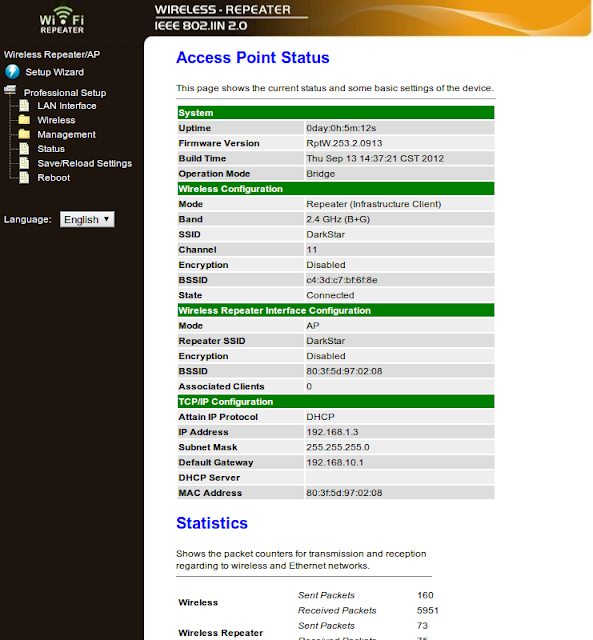
First, navigate to the default configuration URL (http://192.168.10.1), using your preferred browser:
Next, select the “Wireless” option from the “Professional Setup” category:
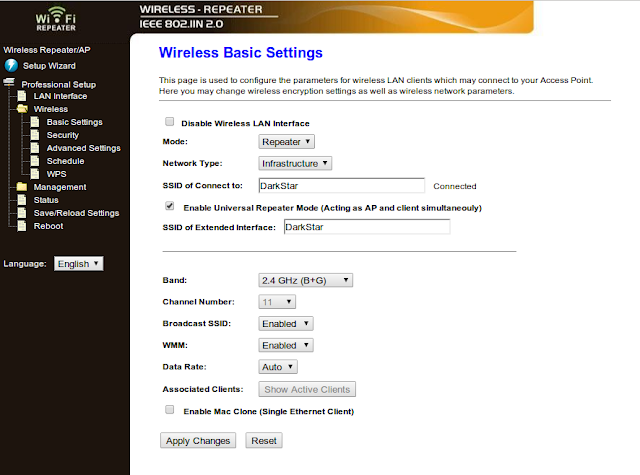
Here, set the following options:

  • “Mode”: “Repeater”
  • “Network Type”: “Infrastructure”
  • “SSID of Connect to” (sic): Enter the SSID of your primary access point
  • Check the “Enable Universal Repeater Mode (Acting as AP and client simultaneouly” (sic) checkbox
  • “SSID of Extended Interface”: Enter the SSID of your primary access point again

If you have configured your primary access point to enable operation in 802.11n mode, then select either “2.4GHz (N)”, “2.4GHz (G + N)”, or “2.4GHz (B+G+N)” from the “Band” menu. Otherwise, “2.4GHz (B+G)” should deliver satisfactory performance for most WAN-based activities.

In order for seamless handover between access points using the same SSID to work well, it is then necessary to set the default 802.11 channel of your primary access point to 11. (This seems to be a hard-coded, preset value).

It may also be necessary to configure WEP, or WPA keys for your primary access point on the “Security” page; and I also recommend changing the configuration tool’s access credentials to something more secure than their default values.

After configuring these settings, the bridge will reboot automatically…

Once the bridge has rebooted, return to the “LAN Interface” page:
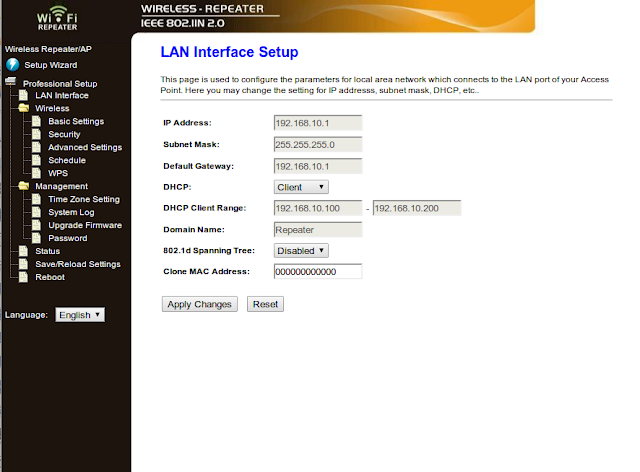
On this page, set the “DHCP” setting to “Client”, and apply changes. At this point, because the bridge will attempt to obtain its configuration IPv4 address from your primary access point/gateway’s DHCP server, it’d be a good idea to disconnect the Ethernet cable, and re-enable the PC’s wireless LAN interface.

Hopefully, at this point, a successful WLAN connection will have been made.

However, in order to maintain future access to the bridge’s configuration server, it is necessary to assign a static IPv4 address to its MAC address (printed on a sticker on the case – but it’ll probably also appear in system/DHCP server logs) using the configuration tool of your primary access point.

After configuring this, power-cycle the bridge, and attempt to access its configuration page via the newly-set IPv4 address. If successful, you should be presented with an authentication dialogue, and be able to see the configuration tool’s status page, as at the beginning.

Hopefully, this will be of assistance to other owners of these devices, or folks contemplating purchasing one.

WAP @ Home

Last night, I decided to install Kannel (an Open Source Wireless Application Protocol gateway), for a challenge.

It seems that installation itself was easy (just a case of downloading a snapshot archive, unpacking it, installing the libxml2-dev package from the Ubuntu repositories, and then running ./configure && make && make install to install it.

However, actually configuring it to run successfully was harder, since the “bearerbox“, and “wapbox” utilities will just unceremoniously quit with a “panic” notice, if they can’t either find their configuration file, or if it isn’t structured in a suitable manner.

I ended up copying the example configuration file from ~/kannel-snapshot/doc/examples/kannel.conf to /etc/kannel/kannel.conf, and modifying it to look like:


group = core
admin-port = 13000
admin-password = bar
wapbox-port = 13002
wdp-interface-name = *
group = wapbox
# SMSBOX SETUP
group = smsbox
bearerbox-host = localhost
sendsms-port = 13013
# SEND-SMS USERS
group = sendsms-user
username = tester
password = foobar
# this sender is for Kannel relay testing (http_smsc)
group = sendsms-user
username = kannel
password = rL4y
user-deny-ip = "*.*.*.*"
user-allow-ip = "127.0.0.1"
# SMS SERVICE Default
# there should be default always
group = sms-service
keyword = default
text = "No service specified"

view raw

kannel.conf

hosted with ❤ by GitHub

I also had to configure my residential gateway/router to use my laptop’s IPv4 address as a DMZ host. (Although I originally intended to just allow inbound traffic on UDP ports 9200, and 9201, for testing purposes).

After doing so, the core BearerBox utility can be invoked with bearerbox /etc/kannel/kannel.conf.

WAPBox is supposed to start automatically – however, it didn’t in my case, so I had to manually invoke
wapbox /etc/kannel/kannel.conf, in order to prevent this error:


2013-05-26 12:42:41 [16085] [1] DEBUG: Thread 1 (gwlib/fdset.c:poller) maps to pid 16085.
2013-05-26 12:42:54 [16085] [6] DEBUG: datagram received
2013-05-26 12:42:54 [16085] [8] DEBUG: Did not find previous routing info for WDP, generating new
2013-05-26 12:42:54 [16085] [8] WARNING: Cannot route message, discard it

view raw

gistfile1.txt

hosted with ❤ by GitHub

To test to see if I could connect to the newly-installed gateway, I decided to play with the “Network Settings” view of the BlackBerry OS version of the Shazam application, since it allows for overriding of the default GPRS/WAP settings.

I ended up using the following settings (which will probably be useless for other readers, but otherwise provide a template):

APN: payandgo.o2.co.uk
Username: payandgo
Password: password
WAP Gateway IP: 95.150.51.112
WAP Port: 9201

(*) These are network WAP Settings

[Y] Enable Overrides

After selecting “Test Settings”, and waiting a while, I eventually received a packet from O2’s GPRS gateway on behalf of my handset:


No. Time Source Destination Protocol Length
396 90.647910000 82.132.221.233 192.168.1.4 WTP+WSP 208 WSP Connect (0x01)
Frame 396: 208 bytes on wire (1664 bits), 208 bytes captured (1664 bits) on interface 0
Interface id: 0
Encapsulation type: Linux cooked-mode capture (25)
Arrival Time: May 26, 2013 12:42:54.674299000 BST
[Time shift for this packet: 0.000000000 seconds]
Epoch Time: 1369568574.674299000 seconds
[Time delta from previous captured frame: 0.371763000 seconds]
[Time delta from previous displayed frame: 0.000000000 seconds]
[Time since reference or first frame: 90.647910000 seconds]
Frame Number: 396
Frame Length: 208 bytes (1664 bits)
Capture Length: 208 bytes (1664 bits)
[Frame is marked: False]
[Frame is ignored: False]
[Protocols in frame: sll:ip:udp:wtp:wsp]
Linux cooked capture
Packet type: Unicast to us (0)
Link-layer address type: 1
Link-layer address length: 6
Source: c4:3d:c7:bf:6f:8e (c4:3d:c7:bf:6f:8e)
Protocol: IP (0x0800)
Internet Protocol Version 4, Src: 82.132.221.233 (82.132.221.233), Dst: 192.168.1.4 (192.168.1.4)
Version: 4
Header length: 20 bytes
Differentiated Services Field: 0x00 (DSCP 0x00: Default; ECN: 0x00: Not-ECT (Not ECN-Capable Transport))
0000 00.. = Differentiated Services Codepoint: Default (0x00)
…. ..00 = Explicit Congestion Notification: Not-ECT (Not ECN-Capable Transport) (0x00)
Total Length: 192
Identification: 0x78fb (30971)
Flags: 0x00
0… …. = Reserved bit: Not set
.0.. …. = Don't fragment: Not set
..0. …. = More fragments: Not set
Fragment offset: 0
Time to live: 101
Protocol: UDP (17)
Header checksum: 0xea17 [correct]
[Good: True]
[Bad: False]
Source: 82.132.221.233 (82.132.221.233)
Destination: 192.168.1.4 (192.168.1.4)
User Datagram Protocol, Src Port: 26131 (26131), Dst Port: 9201 (9201)
Source port: 26131 (26131)
Destination port: 9201 (9201)
Length: 172
Checksum: 0xd37c [validation disabled]
[Good Checksum: False]
[Bad Checksum: False]
Wireless Transaction Protocol, PDU: Invoke (1), Transaction Class: Reliable Invoke with Reliable Result (2)
0… …. = Continue Flag: No TPI
.000 1… = PDU Type: Invoke (0x01)
…. .01. = Trailer Flags: Last packet of message (0x01)
…. …0 = Re-transmission Indicator: First transmission
0… …. …. …. = TID Response: Original
.001 0010 1001 0101 = Transaction ID: 0x1295
00.. …. = Version: Current (0x00)
..1. …. = TIDNew: TID is new
…0 …. = U/P flag: User Acknowledgement optional
…. 00.. = Reserved: 0x00
…. ..10 = Transaction Class: Reliable Invoke with Reliable Result (0x02)
Wireless Session Protocol, Method: Connect (0x01), Version: 1.0
PDU Type: Connect (0x01)
0001 …. = Version (Major): 1
…. 0000 = Version (Minor): 0
Capabilities Length: 19
Headers Length: 136
Capabilities
Client SDU Size: 350000
Protocol Options: (confirmed push facility) (session resume facility)
1… …. = Confirmed Push facility: True
.0.. …. = Push facility: False
..1. …. = Session Resume facility: True
…0 …. = Acknowledgement headers: False
…. 0… = Large data transfer: False
Method MOR: 4
Push MOR: 1
Server SDU Size: 350000
Headers
User-Agent: BlackBerry8520/5.0.0.6818520/5.0.0.681 (ShazamId_SmartWorld_Iota__2.8.2/BBAWFREE) CLDC-1.1 MIDP-2.1
Content-Language: Uighur (ug)
Cache-Control: no-transform
X-Rim-Transcode-Content: none
Connection: close
0000 00 00 00 01 00 06 c4 3d c7 bf 6f 8e 00 00 08 00 …….=..o…..
0010 45 00 00 c0 78 fb 00 00 65 11 ea 17 52 84 dd e9 E…x…e…R…
0020 c0 a8 01 04 66 13 23 f1 00 ac d3 7c 0a 12 95 22 ….f.#….|…"
0030 01 10 13 81 08 04 80 95 ae 30 02 82 a0 02 83 04 ………0……
0040 02 84 01 04 81 95 ae 30 a9 42 6c 61 63 6b 42 65 …….0.BlackBe
0050 72 72 79 38 35 32 30 2f 35 2e 30 2e 30 2e 36 38 rry8520/5.0.0.68
0060 31 38 35 32 30 2f 35 2e 30 2e 30 2e 36 38 31 20 18520/5.0.0.681
0070 28 53 68 61 7a 61 6d 49 64 5f 53 6d 61 72 74 57 (ShazamId_SmartW
0080 6f 72 6c 64 5f 49 6f 74 61 5f 5f 32 2e 38 2e 32 orld_Iota__2.8.2
0090 2f 42 42 41 57 46 52 45 45 29 20 43 4c 44 43 2d /BBAWFREE) CLDC-
00a0 31 2e 31 20 4d 49 44 50 2d 32 2e 31 00 8c ff 88 1.1 MIDP-2.1….
00b0 88 58 2d 52 69 6d 2d 54 72 61 6e 73 63 6f 64 65 .X-Rim-Transcode
00c0 2d 43 6f 6e 74 65 6e 74 00 6e 6f 6e 65 00 89 80 -Content.none…

view raw

gistfile1.txt

hosted with ❤ by GitHub

Unfortunately, it seems that connections are not always successful – presumably due to either WAPBox/BearerBox configuration issues, or problems with connectivity between the GPRS gateway, my handset, and my network.

(I suspect that O2 occasionally block third-party gateway connectivity, or that the BlackBerry OS WAP stack copes badly with multiple failed connection attempts).

Connectivity problems aside, this might be a useful way of debugging/testing applications using cellular data networking on handsets without a Wi-Fi radio.

Repackaged CryptoRF/LibNFC Example Code

Earlier, I tried to build the “NFC-CryptoRF” example code from the LibNFC Wiki, without success against LibNFC 1.7.0-rc4-9-g3584338, under Ubuntu 12.10.

Unsurprisingly, thanks to the LibNFC developers constantly changing their public APIs (for good reasons, I’m sure), said example code has succumbed to bit-rot, and only builds against obsolete versions of LibNFC.

Therefore, it seems that the only immediately obvious way for this code to be useful is to either downgrade the installed library version, or attempt to fix the hacky code to compensate for changes.

Luckily, after temporarily uninstalling my trunk version; downloading, and installing a LibNFC 1.3.4 source archive, applying the patch from a member of the LibNFC Forums to the example code, and attempting to rebuild everything, it seems that the example code works as it should.

After reinstating my modern LibNFC version; configuring 1.3.4’s build process to install to a temporary directory, copying the resulting ancient shared object file to “libnfc.so.0” in the example code directory, and creating a wrapper shell (“crf134“) script based upon the arguments passing technique mentioned here, it seems that I can now enjoy being able to use this tool, alongside more modern, “global” versions of LibNFC…

Anyway, to save others the hassle, I’ve uploaded the resulting product to Google Code.

As proof of peaceful co-existence with a more modern version of LibNFC:


tyson@tyson-HP-Compaq-2510p-Notebook-PC:~/CM$ ./crf134 0 0 0 0
CryptoRF example – (c) Radboud University Nijmegen
Connected to NFC device: ACS ACR122U 00 00 / ACR122U103 – PN532 v1.6 (0x07)
The following (NFC) ISO14443-B tag was found:
ATQB: 50 ff ff ff ff ff ff ff 33 00 10 51
ID: 01 3d 84 04
CID: 00
PARAMS: 08 00 04 d4
Changing active userzone
R: 11 00
T: 11 00 00
Reading first Ci(0) from the system zone (offset = 0x50)
R: 16 00 50 07
T: 16 00 88 ff ff ff ff ff ff ff 00
* Computing authentication values with card secret
Authenticate using Gc, Ci and random Q
R: 18 00 c9 73 ee ed 1d 5e cc e0 bd d9 9e 4e f3 91 a9 09
T: 18 41 a9
Reading new Ci value from the system zone (tag-answer)
R: 16 00 50 07
T: 16 00 00 ff ff ff ff ff ff ff 00
ERROR: Authentication failed
tyson@tyson-HP-Compaq-2510p-Notebook-PC:~/CM$ nfc-list
nfc-list uses libnfc libnfc-1.7.0-rc4-9-g3584338
NFC device: ACS ACR122U 00 00 / ACR122U103 opened

view raw

gistfile1.txt

hosted with ❤ by GitHub

Finally, in order to satisfy the terms of the (L)GPL, I have also included the original, uncompressed LibNFC 1.3.4 archive, the patched example source code, a copy of the patch, and the unpacked LibNFC directory containing both source, and 32-bit Linux binaries.

Finally, CryptoRF

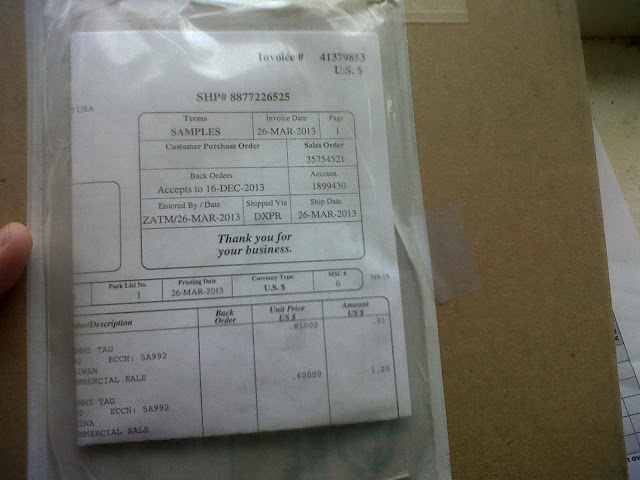
Yesterday, I finally received a package from Atmel USA containing some sample ISO/IEC14443 Type-B CryptoRF tags, after numerous failed attempts at requesting some via their sample request form.

I ordered 1 sample of the 8KB AT88SC0808CRF-MX1 variant, and 2 samples of the 4KB AT88RF04C-MX1G variant.

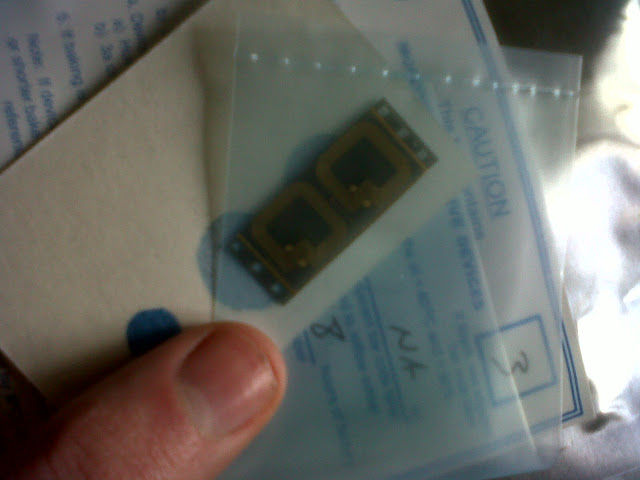
The 4KB tags seem to be unusually packaged, and I don’t know if it’d be safe to carefully attempt to cut the strip in half using scissors, in order to make it easier to work with each:

I was probably expecting to receive paper-mounted tags, similar to my FeliCa Lite, and MiFare UltraLight ones – but the product seems to work as advertised.

Curiously, I was able to trigger an unusual hardware glitch in the PN532 chipset, if I carefully placed the strip of 4KB tags in the reader’s field in a specific way, which manifested in the following output from nfc-list -v:


1 ISO14443B passive target(s) found:
ISO/IEC 14443-4B (106 kbps) target:
PUPI: 50 ff ff ff
Application Data: ff ff ff ff
Protocol Info: 22 00 10
* Bit Rate Capability:
* PICC to PCD, 1etu=32/fc, bitrate 424 kbits/s supported
* PCD to PICC, 1etu=32/fc, bitrate 424 kbits/s supported
* Maximum frame sizes: 16 bytes
* Frame Waiting Time: 0.6041 ms

view raw

gistfile1.txt

hosted with ❤ by GitHub

I’ve also uploaded a USB trace file demonstrating this phenomenon, here.

It seems that I’m supposed to see this, instead:


1 ISO14443B passive target(s) found:
ISO/IEC 14443-4B (106 kbps) target:
PUPI: ff ff ff ff
Application Data: ff ff ff 22
Protocol Info: 00 10 51
* Bit Rate Capability:
* PICC supports only 106 kbits/s in both directions
* Maximum frame sizes: 24 bytes
* Frame Waiting Time: 9.666 ms
* Frame options supported: NAD

view raw

gistfile1.txt

hosted with ❤ by GitHub

Unsurprisingly, I can’t seem to be able to reliably read either of these two, without even more careful positioning – which suggests anti-collision problems (probably since both have the same unique ID, as supplied)…

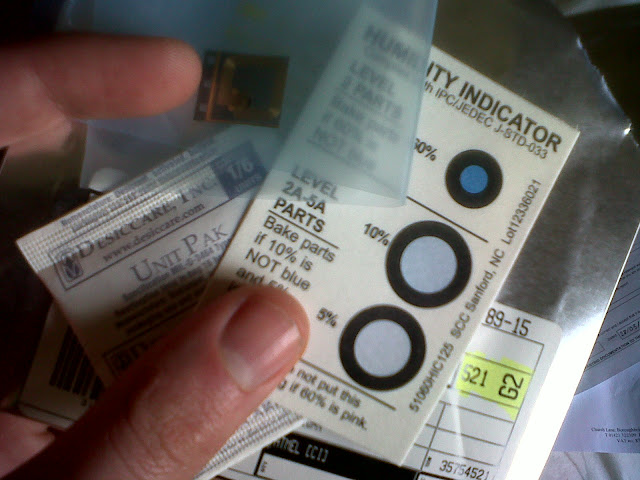
The 8KB version, and its accompanying protective packaging looks like:

(Hand not included!)

…and nfc-list -v says:


1 ISO14443B passive target(s) found:
ISO/IEC 14443-4B (106 kbps) target:
PUPI: ff ff ff ff
Application Data: ff ff ff 33
Protocol Info: 00 10 51
* Bit Rate Capability:
* PICC supports only 106 kbits/s in both directions
* Maximum frame sizes: 24 bytes
* Frame Waiting Time: 9.666 ms
* Frame options supported: NAD

view raw

gistfile1.txt

hosted with ❤ by GitHub

When I get time, I intend to study the datasheet, and probably play with building TAMA shell scripts, with a view to trying to write another command set dissector.

That said, I have, however tried to compile the sample code on the LibNFC wiki, without success.

Maybe someone else has succeeded in building it against the latest revisions of LibNFC?